.png)

The AI-Era Operating System for Mid-Market Professional Firms: 2026 Reference Architecture
What does an AI-native firm actually look like? This 7-layer reference architecture shows law firms, CPA firms, and financial advisories exactly how to structure AI — and what breaks without each layer.
.png)
You are probably already using AI. A few attorneys on your team use ChatGPT to draft briefs. Your CPA associates run document summaries through Claude. Someone on your financial advisory team built a GPT for proposal generation.
That is not an AI operating system. That is a collection of experiments.
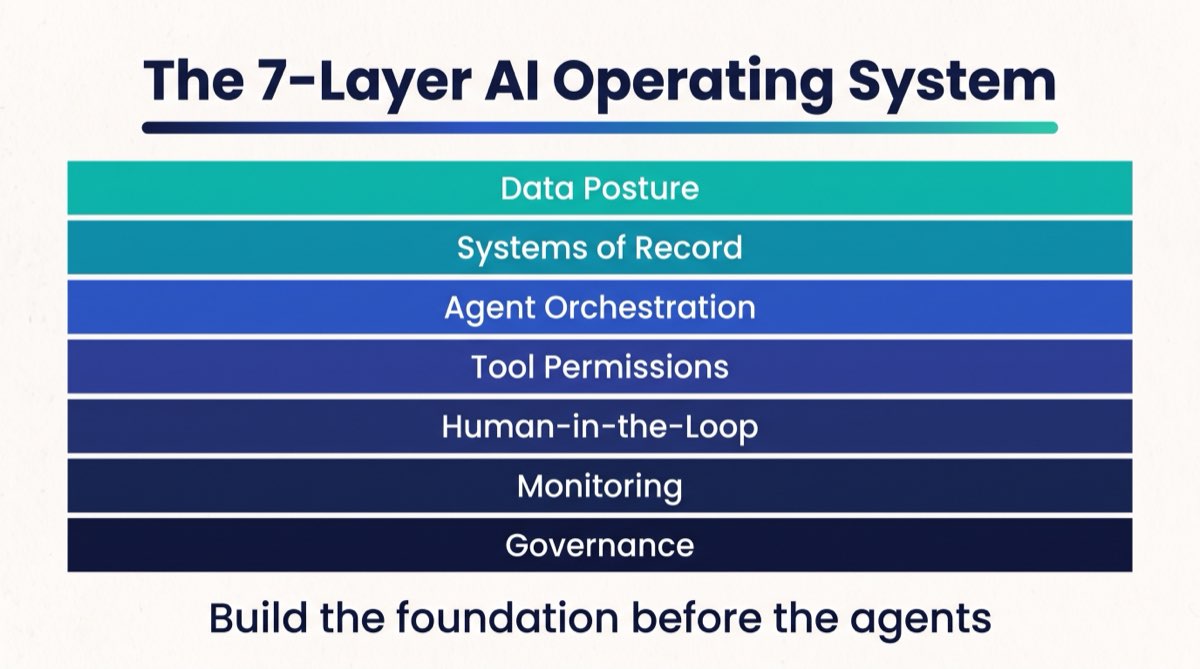
The firms that will pull ahead in the next 36 months are not the ones who have the most AI tools. They are the ones who have built an AI operating system, a structured, governed, auditable infrastructure that lets AI agents do real work inside the firm without creating new liability exposure, data risk, or operational chaos.
This is the reference architecture for building that system. It covers seven layers, from data protection agreements to governance logs, with specific attention to what each layer costs to set up and what breaks without it. Firms covered in this guide include law firms, CPA and accounting practices, financial advisory practices and RIAs, and real estate teams and brokerages.
An AI operating system for a professional firm is the complete set of technical, governance, and operational infrastructure that allows AI agents to read, act on, and respond to firm data in a controlled, auditable way. Most professional service firms that have adopted AI tools still don't have a formal governance structure around them. That gap is the core risk and the core opportunity in the current AI transition.
This article gives you the full architecture. Use it as a checklist, a buying guide, and a conversation starter with your operations and technology partners.
Layer 1: Data Posture. ZDRs, Vendor Agreements, and What You Must Have Before Agents Touch Client Data
The most common mistake firms make when deploying AI is skipping this layer entirely. They connect an AI tool to their CRM, their case management system, or their billing software. They have no idea whether their data is being used to train the model, who stores it, or what happens in a breach.
What it is in plain language: Data posture is the set of legal agreements and data handling configurations that govern what an AI vendor can do with your firm's data. The most relevant instrument is:
A Zero Data Retention agreement (ZDR) is a contractual commitment from an AI provider stating that your firm's prompts, documents, and outputs will not be stored, logged, or used to train future models. OpenAI, Anthropic, and other enterprise API providers offer ZDR options, but they are typically available only on enterprise contracts, not free or consumer tiers.
Accounting firms hold client tax data: returns, financial statements, and identifying information. A well-configured AI system keeps that data inside approved tools, applies the same confidentiality controls the firm already uses, and never sends it to a vendor whose terms allow storage or training.
Financial advisory firms and RIAs face their own data protection requirements under SEC and FINRA regulations, including rules on electronic record-keeping and supervision of automated systems. Law firms face privilege and confidentiality obligations that may be violated if client communications are processed through AI systems without proper contractual protections.
What it costs to set up properly: Negotiating a ZDR with a major AI vendor (OpenAI, Anthropic, Google) on an enterprise contract typically runs $20,000–$100,000 annually depending on usage volume and model access. Many firms route sensitive workloads through their own cloud-hosted model instances (AWS Bedrock, Azure OpenAI Service, Google Vertex AI) where they retain complete data control. Those self-hosted configurations run $5,000–$25,000 a year in infrastructure cost depending on usage.
Legal review of AI vendor agreements by outside counsel runs $2,000–$8,000 per engagement for a mid-market professional firm. Most firms with more than $2M in revenue should budget this.
What breaks without it: Without a ZDR or equivalent data handling agreement, your firm's client documents, financial records, and privileged communications may be processed and stored by the AI vendor under their standard terms. In a law firm, this could breach attorney-client privilege. In a financial advisory, it could trigger SEC recordkeeping violations. In an accounting firm, it could expose client tax data outside the firm's confidentiality controls. The risk is not theoretical. Regulatory bodies are beginning to issue guidance on AI data handling obligations, and enforcement will follow.
Most firms that go through a diagnostic can't answer one simple question: whether they have a ZDR or equivalent with every AI vendor that touches client data. Many have never looked closely at what they signed.
Layer 2: Systems of Record. Why Clean Data Is the Prerequisite for Every AI Deployment
You cannot build an effective AI firm operating system on top of broken data systems. This is the layer most firms want to skip because it is unglamorous, and it reveals problems that have been accumulating for years.
What it is in plain language: Systems of record are the authoritative data sources inside your firm: your CRM, your practice management software, your billing system, your project management tool. "Authoritative" means there is one place where the truth lives for each type of data. If your law firm has client contact information in three places and they all say different things, no AI agent can reliably use that information.
For a law firm, the system of record might be Clio, MyCase, or Filevine. For a CPA firm, it is typically Practice CS, Canopy, or Karbon. For a financial advisory, it is the RIA CRM, so Redtail, Wealthbox, or Salesforce Financial Services Cloud. For a real estate team, it is the CRM and transaction management system. These platforms must be clean, consistently updated, and connected to any AI agent that needs to read from or write to them.
What it costs to set up properly: Data cleanup for a mid-market professional firm with 3–8 years of history typically takes 40–120 hours of staff or contractor time, or $4,000–$15,000 depending on the size and condition of your records. CRM data migration and standardization projects run higher. This is a one-time cost with ongoing maintenance requirements.
What breaks without it: When AI agents operate on inconsistent or incomplete records, they produce incorrect outputs, and those outputs look correct. An AI agent running client communication workflows from a CRM where half the contact records have duplicate entries will send emails to the wrong addresses, miss follow-ups, or generate proposals with the wrong matter details. The error is invisible until a client calls. In a financial advisory practice or law firm, that kind of error is not just embarrassing. It may be a compliance event.
"Otherwise you're just going to automate garbage. Garbage in, garbage out... If it's not producing high-quality repeatable results, you need to redesign the system before you even think of automating."
Felicia Cristofaro, Founder of RunWell
A large share of knowledge worker time at professional service firms goes to reconciling or re-entering data between systems that don't talk to each other. Fixing the systems of record layer eliminates a significant fraction of this before a single automation goes live.
Layer 3: Agent Orchestration. How AI Agents Receive Tasks and Report Results
This is the layer most firms think about when they say "AI." It is the third layer, and it only works if Layers 1 and 2 are in place.
What it is in plain language: Agent orchestration is the infrastructure that assigns tasks to AI agents, coordinates multiple agents working in sequence, and collects their outputs. For a firm that has deployed Claude Routines, Zapier AI, or custom API-based agents, orchestration answers three questions: when an agent runs, what it does, and where the result goes.
The primary orchestration mechanisms in use at mid-market professional firms in 2026 include:
Cron triggers are automated schedules that fire an agent at a specific time. Every Monday at 7 AM, the billing summary agent runs and emails a report to the managing partner.
API calls let a human-facing tool (your CRM, your intake form, your email platform) call an AI agent when a specific event occurs. A new client fills out an intake form, and that triggers a conflict-check agent.
Event-based triggers fire an agent when a system of record changes. A matter status changes in Clio or a tax deadline moves in Karbon, and the agent sends a notification, updates a document, or runs a process.
Multi-agent sequences pass work down a chain. One agent completes a task and hands the result to a second agent for the next step. A document review agent extracts key terms from a contract and passes them to a summarization agent, whose output goes to a drafting agent that prepares a client memo.
What it costs to set up properly: Basic orchestration using Zapier AI or Make with AI steps runs $300–$1,500 per month in platform fees at the scale of a $2M–$5M firm. Custom orchestration using direct API integrations (OpenAI, Anthropic, or a hosted model) plus your own middleware runs higher, typically $1,500–$5,000 per month in infrastructure and maintenance. Purpose-built agent orchestration platforms (Relevance AI, AgentOps, LangSmith) add another $500–$2,000 per month for monitoring and observability on top of the execution costs.
What breaks without it: Without orchestration infrastructure, AI in your firm runs on ad hoc requests. Attorneys and staff prompt individually, outputs live in personal chat histories, and nobody has shared visibility or a consistent process. This is not an AI operating system. It is AI as a personal productivity tool for individuals. The firm does not benefit. Individual users do. And when those users leave, the firm's AI capability leaves with them.
Layer 4: Tool Access Permissions. The Principle of Least Privilege Applied to AI Agents
Most firms that have built AI agents give them more access than they need. This is one of the higher-risk configuration errors in the agentic AI firm setup process.
What it is in plain language: Every AI agent you deploy needs access to systems and data to do its work. Tool access permissions define exactly what each agent can read, what it can write, and what it can execute, and nothing more. This is called the principle of least privilege, borrowed from information security.
A billing summary agent needs read access to your billing system. It does not need write access. It does not need access to HR records or client matter documents. If that agent's API key is compromised, the damage is limited to what the agent could read, not to everything in your firm's tech stack.
For a law firm deploying AI agents, a typical permission structure might look like this:
| Agent | Read Access | Write Access | Execute Access |
|---|---|---|---|
| Conflict check agent | Matter database, client database | None | None |
| Billing summary agent | Time entries, billing records | None | Email (send only) |
| Document review agent | Matter documents | Draft documents folder | None |
| Client intake agent | Intake forms | CRM (new records only) | Email (send only) |
| Collections follow-up agent | AR records, client contact info | None | Email (send only) |
What it costs to set up properly: Defining permission structures is primarily a time cost, 8–20 hours of work by whoever manages your firm's systems and AI integrations. Implementing least-privilege configurations in major platforms (Salesforce, Clio, QuickBooks, etc.) typically requires an admin-level user or an outside IT consultant. Budget $1,500–$4,000 for a one-time permission audit and implementation at a firm with 5–10 active AI integrations.
What breaks without it: Overpermissioned agents create three categories of risk. First, accidental data modification. An agent with write access where it only needed read access can corrupt records, overwrite billing entries, or update matter statuses incorrectly. Second, security exposure. A compromised API key for an overpermissioned agent gives an attacker access to far more than the agent needed. Third, compliance exposure. In regulated industries, agents with access to records they should not touch may create audit trail problems.
Layer 5: Human-in-the-Loop Gates. Which Decisions Always Require a Human
This is the layer that separates a firm that has adopted AI responsibly from one that has outsourced judgment to an algorithm.
What it is in plain language: Human-in-the-loop (HITL) gates are explicit checkpoints in AI-assisted workflows where a human must review and approve before the agent can proceed. They are not an admission that AI is unreliable. They are a recognition that some categories of decision carry consequences significant enough that automated action is not appropriate, regardless of the AI's confidence level.
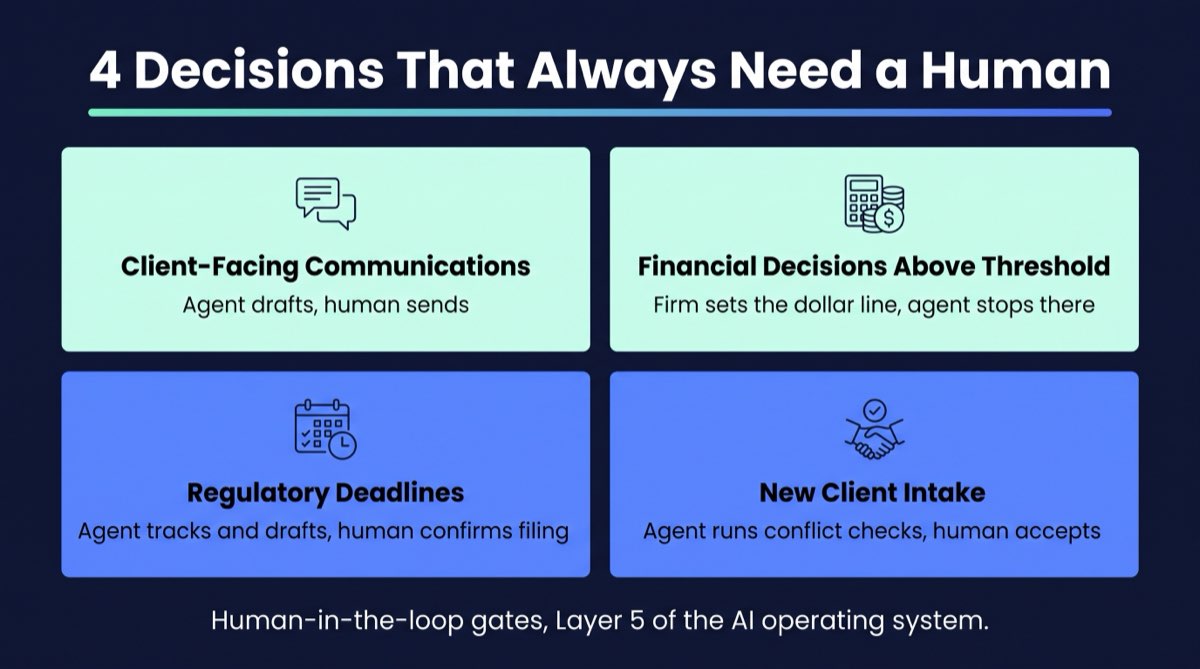
For a human-in-the-loop firm, the question is not whether every decision needs a human. It is which decisions specifically require one. The categories that most professional service firms should fence off from full automation:
Client-facing communications about substantive matters. An AI agent can draft the response. A human sends it. This applies to law firms (substantive legal advice), financial advisories (investment recommendations or material plan changes), and CPA firms (audit findings or tax positions).
Any decision with direct financial consequence above a threshold. Define the threshold explicitly, whether that is $500, $5,000, or $25,000. Below the threshold, agents can act. Above it, a human approves.
Matters involving regulatory deadlines. Filing deadlines, statute of limitations dates, tax filing dates, regulatory submission windows. AI can track them and draft the work product. A human confirms before submission.
New client intake decisions. Whether to accept a new client engagement. AI can run conflict checks, generate risk scores, and prepare the intake summary. A human makes the acceptance decision.
What it costs to set up properly: HITL gates are primarily a process design cost, not a technology cost. The work is defining which workflows require gates, configuring your orchestration layer to pause and route for human approval, and training staff on the review process. This is typically a 20–40 hour project for a firm's operations lead, with another $2,000–$5,000 if you are using a consultant to configure the approval workflows in your orchestration platform.
What breaks without it: Without explicit HITL gates, AI agents will eventually take an action a human would not have approved. In a law firm, this might mean sending a communication that inadvertently creates or waives a legal obligation. In a financial advisory, it might mean executing a recommendation that should have been reviewed in light of the client's recent life changes. In a CPA firm, it might mean submitting a document before a partner had a chance to catch an error. These are not AI failures in the narrow technical sense. They are process design failures. The firm never told the agent where to stop and wait.
Every firm wants AI to move faster. The harder question is which decisions you're comfortable letting an agent make without you, and most owners haven't thought it through. The firms that get this right build the gates before they deploy the agents, not after.
Layer 6: Monitoring and Health Dashboards. How You Know Your Agents Are Working
The single most underinvested layer at every mid-market professional firm that has deployed AI. Firms build agents, see them working at launch, and stop checking.
What it is in plain language: Monitoring is the infrastructure that tracks whether your AI agents are running, completing their tasks, producing outputs within expected quality bounds, and handling errors without failing silently. A health dashboard is the interface that shows you this data in near-real time.
For a firm running 5–10 active agents, a minimum viable monitoring setup tracks:
- Run success and failure rate. Whether each scheduled or triggered run completed, plus the failure rate over the last 7 and 30 days.
- Output quality signals. For agents that produce structured outputs like summaries, reports, and drafted documents, whether those outputs stay within expected length and format bounds. Sudden changes often mean a prompt issue or a model update that broke an existing workflow.
- Latency. Whether agents finish inside expected time windows. A billing summary that normally runs in 2 minutes and now takes 25 points to a data access problem.
- Error alerts. When an agent fails, who gets notified, through what channel, and how fast.
Platforms that provide this monitoring infrastructure include LangSmith (for LangChain-based agents), AgentOps, Helicone, and the native observability tools in AWS Bedrock and Azure OpenAI Service. Most orchestration platforms (Zapier, Make, n8n) also provide basic run history logs, though these are typically insufficient for multi-agent workflows.
What it costs to set up properly: Basic run logging and alerting through your orchestration platform is often included in your existing subscription. Purpose-built agent observability platforms run $300–$2,000 per month depending on agent volume and log retention requirements. Setting up a simple health dashboard using a tool like Notion, Airtable, or a lightweight analytics platform adds $200–$500 in setup time.
What breaks without it: Without monitoring, agents fail silently. The billing summary stops running because an API key expired, and nobody notices for three weeks. The conflict check agent starts returning incomplete results because a database schema changed, and two matters get opened without a clean conflict check. The collections follow-up agent starts sending emails to the wrong address format because a CRM field mapping broke. None of these failures are obvious from the outside. They accumulate quietly until someone finds the problem, usually a client or a staff member, usually in a way that costs the firm time and trust to resolve.
Broken automations that go undetected for 30+ days are a common cause of automation abandonment. Firms that experience a significant undetected failure often stop trusting AI tools entirely and revert to manual processes, creating a larger operational problem than they started with.
Layer 7: Governance and Audit Logs. Who Authorized What, When, and What the Agent Did
This is the layer that turns AI deployment from a technology experiment into a defensible business practice.
What it is in plain language: Governance covers three questions: who is authorized to build, modify, or deploy AI agents at your firm, what oversight process exists before a new agent goes into production, and what record exists of what the agent did after it ran.
Audit logs are the record of agent activity: every input, every output, every action taken, timestamped and attributed to a specific agent and its configuration at the time. For a financial advisory operating under SEC supervision, audit logs for AI-assisted client communications may be required by existing electronic recordkeeping rules. For a law firm, audit logs create an evidentiary record in the event that an AI-assisted process is ever challenged in a malpractice context.
The AI governance framework for a mid-market professional firm does not need to be a 200-page policy document. It needs to answer four questions:
- Who can build agents? Not every staff member should be authorized to connect AI tools to firm systems. Define who has this authority. Most firms designate one or two operations or technology leads.
- What testing and review happens before an agent goes live? Define a minimum review process: the agent is documented (what it does, what it accesses, what its outputs look like), tested in a sandbox with non-production data, reviewed by the designated authority, and approved before connecting to live systems.
- How is the agent's activity logged? Every agent run creates a log entry. The log captures the agent ID, the timestamp, the inputs provided, the outputs returned, the actions taken (documents created, emails sent, records modified), and whether human approval was triggered.
- How long are logs retained? Retention requirements vary by industry. SEC requires electronic records for 3–6 years depending on the record type. Law firm requirements vary by state and matter type. Define your retention policy for AI audit logs and enforce it technically, not manually.

What it costs to set up properly: Governance policy drafting is a $3,000–$8,000 engagement with an outside operations or legal consultant, depending on the firm's complexity and regulatory environment. Implementing technical audit logging through your AI infrastructure (API logging via your cloud provider, agent run history in your orchestration platform) is primarily a setup cost of $2,000–$6,000. Some regulated firms will need ongoing compliance review of their AI governance framework as regulations evolve, so budget $3,000–$10,000 annually for this.
What breaks without it: Without governance, AI at your firm has no accountability structure. When something goes wrong, and at some point it will, you have no documentation of what the agent was authorized to do, what it did, or who approved the deployment. In a regulated industry, this creates liability exposure. In any professional service firm, it creates client trust risk. The absence of audit logs does not mean nothing happened. It means you cannot prove what happened when someone asks.
What the Full AI Operating System Costs to Build
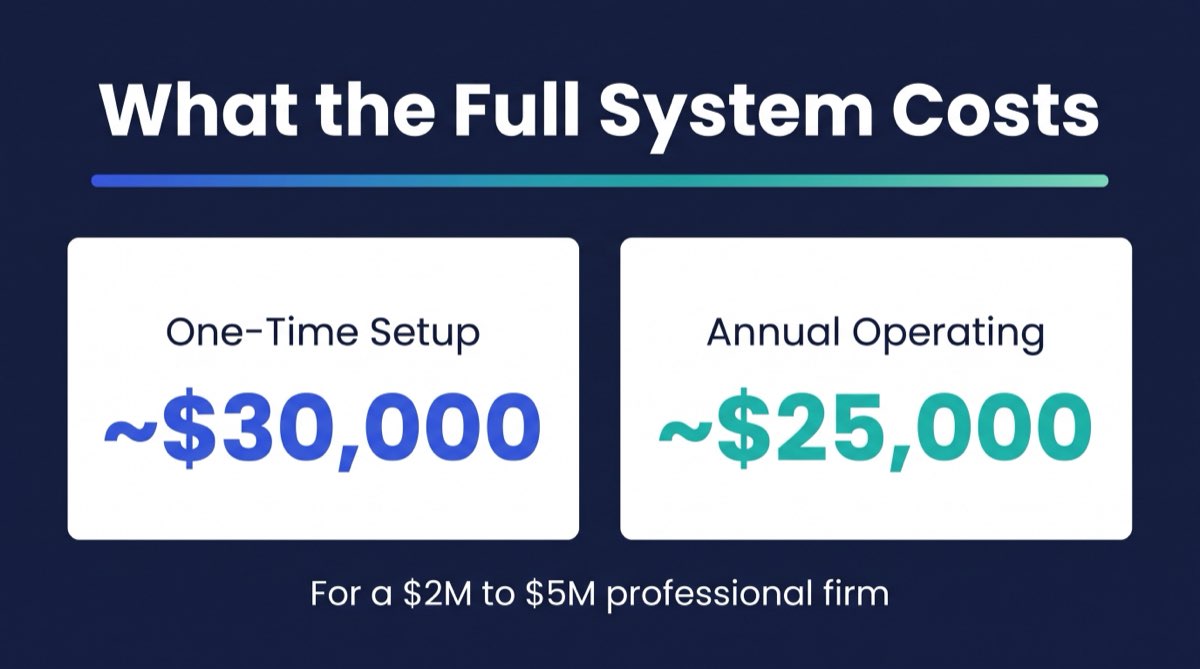
Before we get to the FAQ, here is a composite cost picture across all seven layers for a professional firm at $2M–$5M in revenue:
| Layer | One-Time Setup Cost | Annual Operating Cost |
|---|---|---|
| Data Posture (ZDR, legal review) | $5,000–$15,000 | $5,000–$25,000 |
| Systems of Record (data cleanup, standardization) | $4,000–$15,000 | $2,000–$6,000 |
| Agent Orchestration (platform fees + build) | $3,000–$12,000 | $4,000–$18,000 |
| Tool Access Permissions (audit + configuration) | $1,500–$4,000 | $500–$2,000 |
| Human-in-the-Loop Gates (process design + config) | $2,000–$5,000 | $1,000–$3,000 |
| Monitoring + Health Dashboards | $1,000–$4,000 | $2,400–$24,000 |
| Governance + Audit Logs | $5,000–$14,000 | $3,000–$10,000 |
| Total (midpoint) | ~$30,000 | ~$25,000 |
These are not vendor-quoted figures. They are planning estimates based on typical vendor pricing and the operational patterns we see when firms build this kind of infrastructure. Your actual costs will vary based on your current state, your tech stack, your regulatory environment, and whether you are building internally or with outside help.
The more relevant question is what it costs not to build the operating system. Firms that deploy AI tools without governance and monitoring infrastructure commonly spend 8–12 hours per month per agent managing failures, correcting errors, and manually doing work the agent was supposed to handle. At a blended billing rate of $200–$400 per hour, that is $20,000–$58,000 in annual waste per broken or ungoverned agent.

Building This in Phases, Not All at Once
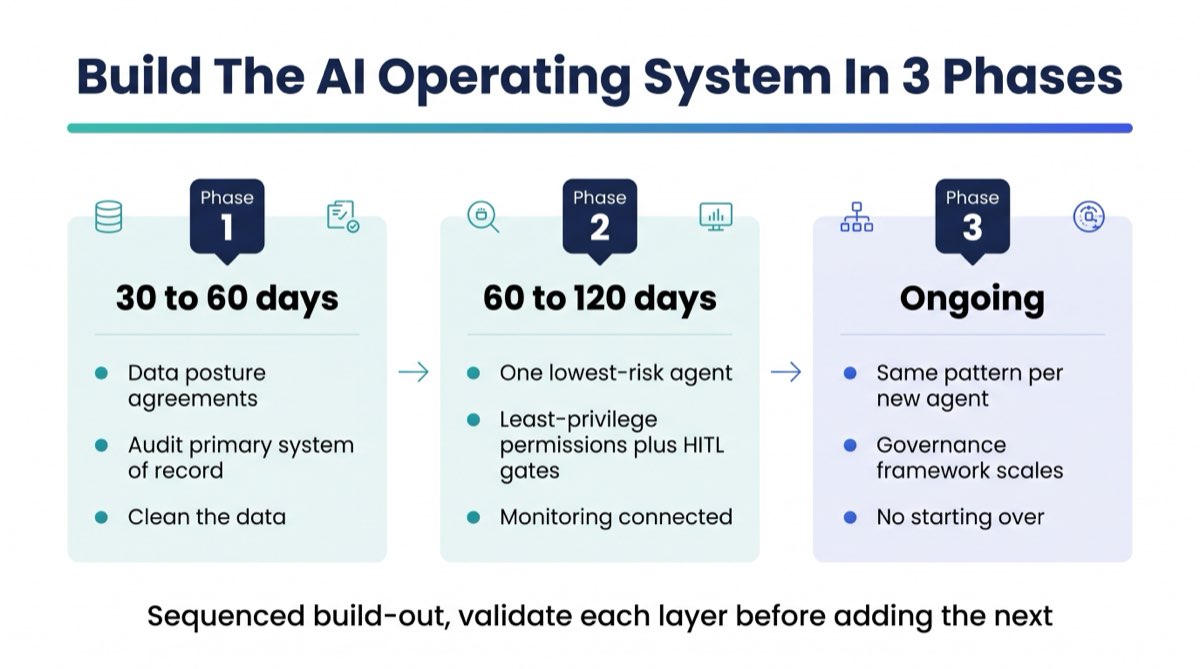
The firms that get this right do not try to build all seven layers in 90 days. They build in sequence, and they validate each layer before adding the next.
A practical phasing for a firm starting from scratch:
Phase 1 (30–60 days): Data posture and systems of record. Get your legal agreements in place. Audit and clean your primary system of record. This is unglamorous, but it is the foundation everything else sits on.
Phase 2 (60–120 days): First agent with full governance. Build one agent, your lowest-risk, highest-value process. Stand up the orchestration, configure least-privilege permissions, define the HITL gates, and connect the monitoring. Get one agent running cleanly before building five more.
Phase 3 (ongoing): Expand with a governance-first approach. Each new agent follows the same pattern as Phase 2. The governance framework built in Phase 2 scales. You are not starting over for each new agent.
RunWell's Blueprint engagement is designed specifically for Phase 1 and Phase 2. It starts with an operational audit that establishes your current state across all seven layers, then produces a documented system map and automation roadmap. You know exactly where you are, what needs to happen first, and what each phase costs before any build begins.
If you want to start by understanding where your firm is right now across these seven layers, the RunWell Blueprint benchmarks your operational readiness. It will show you which layers are already in place and where the most significant gaps are.
The firms that will build sustainable AI advantages are not the ones who moved fastest. They are the ones who built the right foundation first.
Frequently Asked Questions
How should my firm structure its AI?
Structure your firm's AI around seven layers: data posture agreements (ZDR), clean systems of record, agent orchestration infrastructure, least-privilege tool access permissions, human-in-the-loop approval gates, monitoring and health dashboards, and governance with audit logs. Most firms try to skip to orchestration (Layer 3) without building the foundation. That is what produces the failed AI experiments most firms have already experienced.
What does an AI-native firm look like?
An AI-native firm has AI agents handling defined, repeatable operational tasks like billing summaries, document reviews, conflict checks, collections follow-ups, and intake processing, with clear governance, monitored performance, and documented human approval gates for consequential decisions. The attorneys, CPAs, and advisors are doing the work only humans can do. The AI is handling the infrastructure of practice management. The firm can answer "what are all our AI agents doing right now?" with a dashboard, not a guess.
What is the operating system for an AI-era firm?
The AI-era operating system is the complete set of technical and governance infrastructure that allows AI agents to work inside a firm safely and accountably. It is not a single software product. It is a seven-layer architecture covering data protection agreements, systems of record quality, agent orchestration, tool permissions, human approval gates, monitoring, and audit logging. No single vendor sells all seven layers. Building it requires design decisions specific to your firm's regulatory environment and operational state.
What is an AI stack for a professional services firm?
The AI stack for a professional services firm includes: (1) an AI vendor with appropriate data protection agreements, (2) clean systems of record (CRM, practice management, billing), (3) an orchestration platform (Zapier AI, Make, n8n, or a custom API layer), (4) a permission management system controlling agent access, (5) a human approval workflow for gated decisions, (6) an observability platform for monitoring agent runs, and (7) audit logging infrastructure. The specific tools at each layer vary by firm type and existing tech investment.
What layers does an AI operating system have?
An AI operating system for a professional firm has seven layers: Data Posture, Systems of Record, Agent Orchestration, Tool Access Permissions, Human-in-the-Loop Gates, Monitoring and Health Dashboards, and Governance and Audit Logs. Layer 1 covers ZDRs and vendor data agreements. Layer 2 covers CRM and practice management data quality. Layer 3 covers how agents are triggered and coordinated. Layer 4 covers least-privilege configuration. Layer 5 covers required human approval points. Layer 6 covers agent performance visibility. Layer 7 covers accountability and compliance documentation.
How do I govern AI at my firm?
AI governance at a professional firm requires answering four questions: who is authorized to build and deploy agents, what review process happens before an agent goes live, how is agent activity logged, and how long are those logs retained. For most mid-market professional firms, governance does not require a dedicated AI compliance team. It requires a designated operations lead, a documented review process, and technical logging configured in your AI infrastructure. Firms in regulated industries (financial advisory, accounting, law) should have outside counsel review their governance framework.
What is a ZDR and why does my firm need one?
A Zero Data Retention agreement (ZDR) is a contractual commitment from an AI vendor that your firm's documents, prompts, and outputs will not be stored, logged, or used to train AI models. Professional firms handling confidential client information (legal matters, financial records, client tax data) need a ZDR or equivalent agreement in place before deploying AI tools on client data, because standard consumer and SMB AI tool terms typically do not include this protection. ZDRs are generally available only on enterprise contracts with major AI vendors and should be reviewed by legal counsel.
Is this AI operating system architecture different for a law firm versus a financial advisory?
The seven layers are the same across all professional service firms, but the specific requirements within each layer differ significantly by industry. Law firms have attorney-client privilege and professional responsibility obligations that affect data posture and governance. Financial advisories and RIAs have SEC and FINRA electronic recordkeeping and supervision requirements that affect audit logs and human-in-the-loop gates. Accounting firms hold client tax data, so their systems keep that data inside approved tools with controlled access and retention. The architecture is universal. The regulatory requirements that shape each layer are industry-specific.
Questions we get after this article


Want to see your firm's number?
10 questions. 3 minutes. A score out of 100 plus your top 3 operational gaps, with a dollar figure attached. Free. No email required to see the result.
Disclaimer. This article is for educational purposes only and does not constitute legal, accounting, tax, medical, or financial advice. References to specific compliance frameworks (ABA Model Rules, AICPA SSTS, SEC/FINRA, state bar rules) reflect the authors' and reviewers' interpretation as of the publish date and may not apply to your jurisdiction or specific facts. Consult your own licensed advisor before acting on anything written here. Statistics and case details have been anonymized; dollar figures reflect actual client outcomes as of the engagement date. RunWell is not a law firm, CPA firm, or registered investment advisor.