.png)
Zap vs. Workflow vs. AI Agent: The $500K Automation Decision
Learn when to use Zapier, a workflow engine like n8n, or an AI agent. A tactical decision framework for professional firms — with real examples and cost data.
.png)

You picked the wrong automation tool for three jobs. Not because you skipped the research. Because nobody told you there's a structured way to match the job to the tool before you build anything.
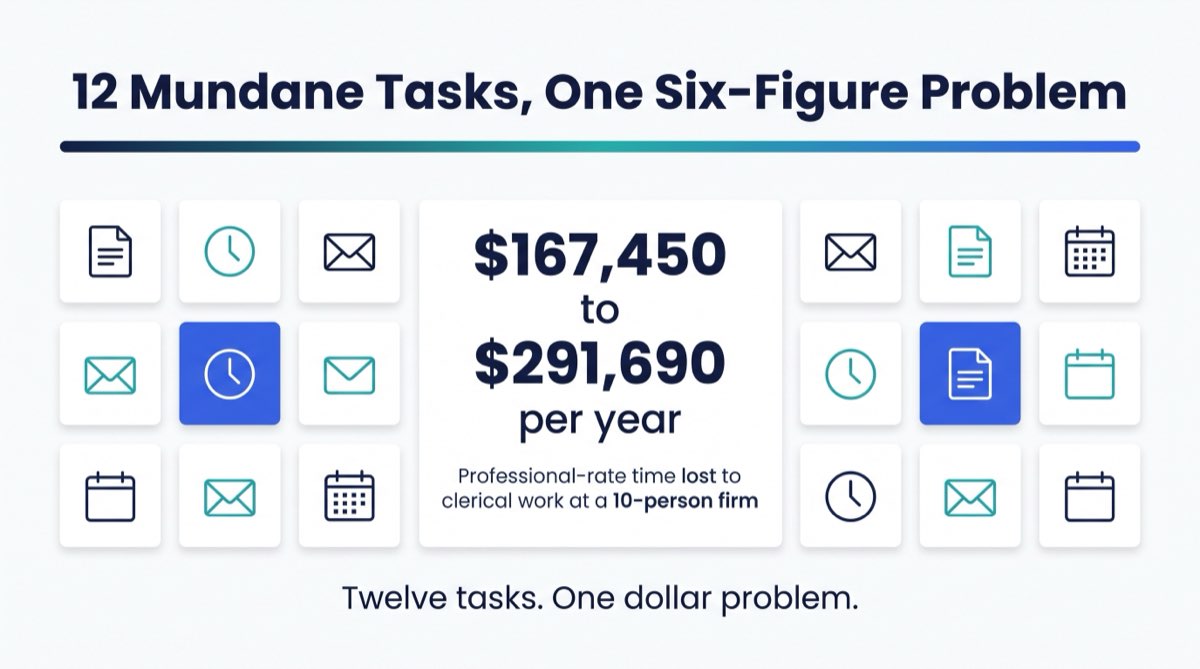
That choice, made dozens of times across three years at a $3M to $5M firm, compounds. Zaps that break every time a field changes. Workflow engines built for simple triggers that buckle under branching logic. AI agents deployed where a single Zapier step would have done the job in 20 minutes. Rework, consulting hours, overlapping subscriptions, and staff time spent managing workarounds all add up. Over a three-year window at a firm that size, the number can land anywhere from $150K to $500K in recoverable value.
That's the $500K decision in the title. It doesn't get made once. It gets made every time someone on your team says "can we automate this?"
This article gives you a three-tier decision framework for the most important question in your automation stack: given a specific job, which tool do I pick?

The Core Principle Behind the Decision Framework
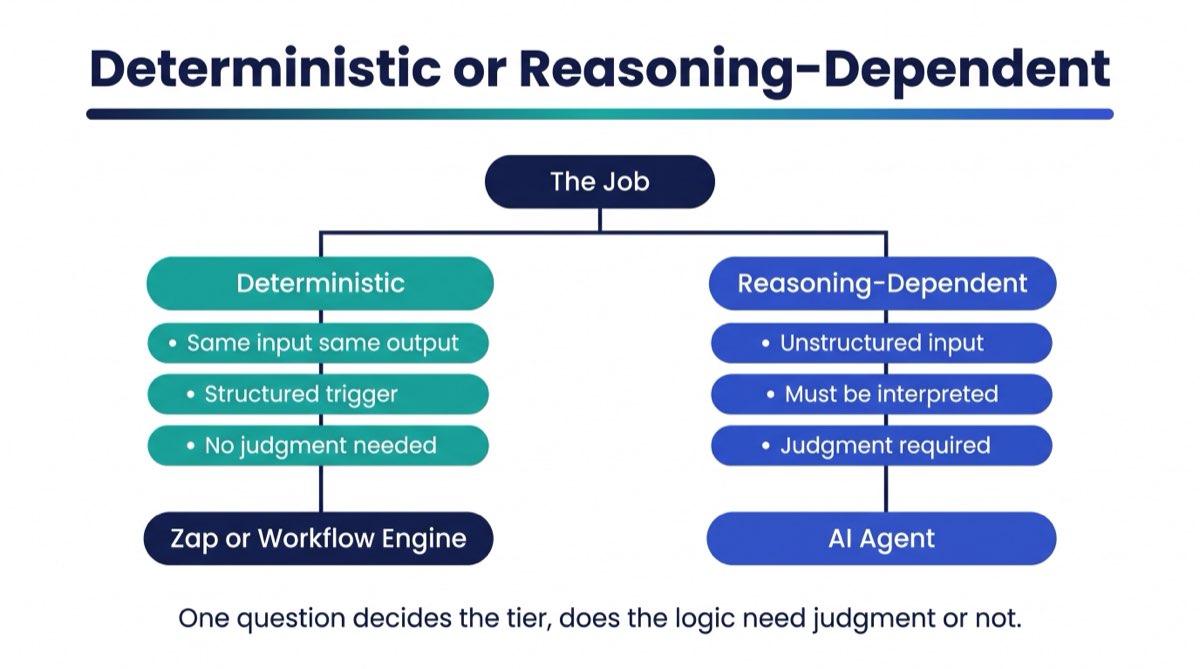
Before you pick a tool, answer one question: is the logic deterministic, or does it require reasoning?
Deterministic logic means the same input always produces the same output. A new contact lands in your CRM with the source "Paid Search," and your intake coordinator gets a task. Every time. No exceptions. No judgment.
Reasoning-dependent logic means the right action depends on reading, interpreting, or evaluating something that isn't structured. An email arrives. Does it go to the intake queue, the billing team, or the escalation folder? A document is uploaded. Is the application complete or partial? A client message comes in at 11 PM. Is it urgent enough to trigger an on-call notification?
That distinction, deterministic versus reasoning-dependent, is the fork in the road. Almost every bad automation build we've seen at RunWell traces back to one of two mistakes. Someone applied a deterministic tool to a reasoning-dependent job, or spent four times the budget on an AI agent for work a Zapier step would have handled in a day.
"Zapier kind of says, here's the right puzzle you need to use. When you work with an AI agent, it's more like, I'm going to design the puzzle for you, create all the pieces, and help you put it together."
Felicia Cristofaro, Founder of RunWell
Tier 1: When a Zap Is Exactly Right
A Zap (or the equivalent in Make.com's simplest trigger-action setup) is the right tool when:
- The logic is fully deterministic
- The same inputs always produce the same outputs
- Nothing has to be read, classified, or judged
- The trigger is a structured data event (form fill, CRM field update, calendar entry, payment receipt)
This tier covers more than people think. It's also the first thing people reach for when they're out of their depth, which is why Zaps keep landing on jobs they can't handle.
Real Example 1: Law Firm CRM Sync
A mid-size estate planning firm runs Clio (legal practice management) alongside a separate CRM for business development. Every time a Clio matter moves to "Active," the Zap creates a CRM contact record with the matter type, originating attorney, and open date. Same event, same fields, every time. Build time: under four hours. Ongoing reliability: near-perfect, because the inputs never change.
Real Example 2: CPA Firm Invoice Trigger
A regional accounting firm bills through QBO. When an invoice moves to "Sent" status, a Zap fires a Slack notification to the partner assigned to that client. It's a state change in a structured system triggering a notification. The workflow never needs to think. Build time: two hours. Failure rate: essentially zero.
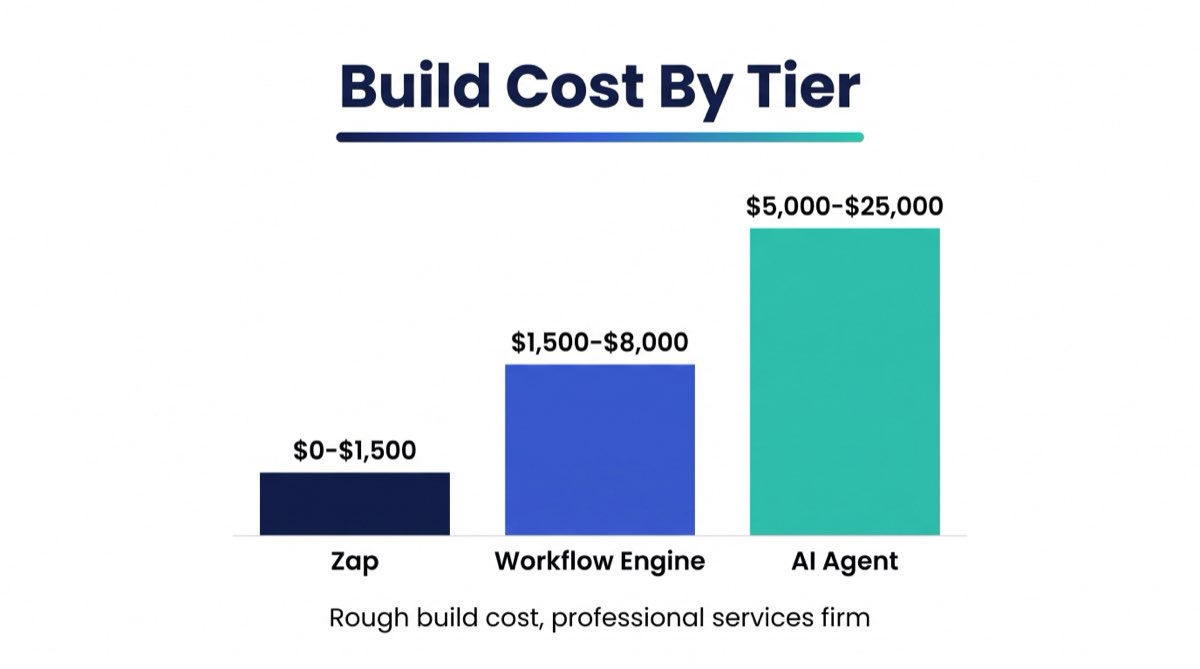
Rough Build Cost: $0–$500 for straightforward single-trigger Zaps. Bring in a developer and it's $500–$1,500 for a clean, documented build.
Primary Failure Mode: Using a Zap when the job requires branching. If your intake has three possible outcomes based on the contact's inquiry type, a basic Zap routes everything to path A and ignores B and C. You find out in week two, when clients are being miscategorized and nobody can figure out why.
Tier 2: When You Need a Workflow Engine
A workflow engine, meaning n8n, Make.com with branching, or custom-scripted multi-step logic, is right when:
- The logic is still deterministic, but there are conditions, branches, and exceptions
- You need error handling, retries, or fallback paths
- Multiple systems need to pass data between steps, not just trigger and react
- You're normalizing data before it lands in a destination system
- There are approval gates with fixed rules
The key word is deterministic. Even logic with fifteen branches is still a workflow engine job if every branch resolves the same way given the same input. If the answer can always be looked up in a table or decided by a fixed rule set, a workflow engine handles it.
Real Example 1: Financial Advisory Onboarding Pipeline
A registered investment advisory firm built a Make.com scenario for new client onboarding. When a signed agreement lands in a specific folder, the scenario checks the account type (taxable, IRA, trust), routes it to the correct custodian template, creates the client record in their CRM with the right tags, triggers a compliance task list, and sends a welcome email from the assigned advisor's address. Seven branches, driven by account type and custodian. Every branch resolves predictably, because the same account type always takes the same path. Build time: three to four days. Ongoing maintenance: minimal, because the rules don't change.
Real Example 2: Real Estate Team Lead Routing
A 12-agent residential team routes inbound leads through n8n. The scenario checks the lead source, the price range entered on the form, the lead's zip code, and the agent's current capacity score (pulled from a Google Sheet). Those four structured inputs assign the lead to one of four agents and create a follow-up task. It looks complex. It's still deterministic, because the routing logic is a table, not a judgment call. Build time: five to seven days including testing. Cost: $2,000–$5,000 with a developer.
Rough Build Cost: $1,500–$8,000 depending on complexity and number of systems. In-house if your ops manager is technical. Outsource if not, and document every branch before you hand it off.
Primary Failure Mode: Building a workflow engine scenario when the inputs are unstructured. If your routing logic depends on reading the body of an email or interpreting a free-text field, the engine fails or produces garbage. You patch it with more conditions, and six months later you have a monster scenario nobody can debug. That's the moment an AI agent should have been called in from the start. A scenario like this can look solid in testing and still fail quietly once it meets a real inbox. It handles the cases you planned for, misroutes the ones you didn't, and nobody notices until weeks of intake have gone to the wrong place. That's not a workflow engine failure. That's a tool-selection failure.
Tier 3: When You Need an AI Agent
An AI agent is right when:
- The input is unstructured (email body, uploaded document, voice transcript, free-text form field)
- Classification, summarization, or interpretation has to happen before any action can be taken
- The agent needs to coordinate across multiple tools based on context, not a fixed rule
- Exception handling requires judgment (this looks unusual, flag it for human review)
- The business needs to act on context and tone, not just structured events
This is the tier that's both most powerful and most overused in 2026. The mistake runs in both directions. Some firms avoid AI agents entirely and eat the cost of triaging unstructured inputs by hand. Others deploy agents for jobs a single Zap handles better, then wonder why they're paying for Anthropic API calls to fire a Slack notification.
Real Example 1: Law Firm Intake Qualification
A personal injury firm receives 300+ inbound inquiries per week via email, web form, and live chat. Roughly 60% are out-of-scope (wrong case type, wrong state, already represented). Before the AI agent, three paralegals spent their mornings on triage. Now the agent reads each inquiry, classifies it by case type, extracts the key facts (date of incident, injury type, insurance status), scores it against the firm's intake criteria, and either sends a not-a-fit response, schedules a free consult call, or flags it as a priority matter. The same logic was attempted first as a workflow engine build. It lasted four weeks before the edge cases broke it. Build time with an AI agent layer: two to three weeks including testing. Ongoing cost: $400–$800/month in API and tool costs.
Real Example 2: Accounting Firm Document Triage
A regional CPA firm receives client documents by email, shared drive upload, and physical scan throughout tax season. Working out whether a document was complete, what year it covered, and which client it belonged to was consuming two hours of staff time per day. An AI agent now ingests documents from three sources, classifies document type, extracts the tax year and client identifiers, checks the client record for expected documents, and creates a task if something is missing. Documents it can't classify with confidence go to a human review queue. Build time: three weeks. Ongoing cost: similar to the law firm example above.
Rough Build Cost: $5,000–$25,000 for a production-grade AI agent, depending on tool complexity, number of integrations, and how well the process is documented before the build starts. Ongoing API costs of $200–$1,500/month depending on volume.
Primary Failure Mode: Deploying an AI agent on a process that isn't documented. The agent handles unstructured inputs, but it still needs to know what to do with what it reads. If the classification criteria live in someone's head instead of on paper, the agent invents its own decision framework. RunWell turns down AI agent builds when the client can't answer one question: "If a human were making this decision, what would they look for?" If you can't answer that, you're not ready.

The Decision Matrix: Choosing the Right Automation Tier
Use this table as your starting point for any new automation job.
| Criteria | Tier 1: Zap | Tier 2: Workflow Engine | Tier 3: AI Agent |
|---|---|---|---|
| Input type | Structured event (form, field, status) | Structured event with conditions | Unstructured (email, document, voice) |
| Logic type | No logic, trigger-action | Deterministic branching | Reasoning / classification required |
| Error handling | Minimal | Built-in retries, fallback paths | Confidence scoring + human escalation |
| Typical build time | Hours to 1 day | 3–7 days | 2–4 weeks |
| Rough cost to build | $0–$1,500 | $1,500–$8,000 | $5,000–$25,000 |
| Ongoing monthly cost | $20–$100 (subscription) | $50–$500 | $200–$1,500 (API + hosting) |
| Typical professional services use cases | CRM syncs, invoice triggers, calendar-to-task, notifications | Lead routing, onboarding pipelines, approval chains, data normalization | Intake qualification, document triage, client comms drafting, exception handling |
| Failure mode if wrong tool used | Miscategorized records, silent failures on edge cases | Unreadable mega-scenarios, unhandled unstructured inputs | Hallucinated decisions, unpredictable outputs without documented criteria |
The Overlap Zone: Where Firms Get Stuck
The hardest calls are the jobs that sit between tiers. Three patterns show up again and again.
The Hybrid Job: The trigger is structured, a form submission, but one field is a free-text describe your situation box that drives routing. The first 90% of the job belongs to a workflow engine. The last 10% needs an AI agent to read that field. The right answer is a workflow engine that hands off to an agent for the classification step, not one tool or the other.
The Maturity Gap: A firm wants an AI agent for client intake but has never written down its intake criteria. The first step is documenting the decision logic, then building a workflow engine to handle the structured cases, then layering in an AI agent once the edge cases are understood. Skipping to the agent before the process is documented is a reliable path to a failed build.
The "Just Build a Zap" Reflex: Ops managers who've used Zapier for years reach for it first, for everything. It's familiar, it's cheap, and it works, right up until it doesn't. Knowing when a job has outgrown a Zap is the most underrated operational skill in a professional firm's tool stack. If you're writing Zapier documentation that reads like a decision tree, you've outgrown a Zap.

How RunWell Approaches the Tool Selection Decision
RunWell doesn't have a preferred automation vendor. We use Zapier, Make, n8n, and AI agents inside the same engagement depending on the job, which is why the diagnostic phase matters more than the build phase.
Firms that document their process before they automate it get more out of the automation than firms that skip that step. That matches what RunWell sees in professional firm engagements: the tool almost never fails. The process definition usually does.
Before RunWell builds anything, we document the job step by step. What triggers it, what inputs arrive, what decision logic applies, what outputs are required, and who is accountable when it breaks. That documentation determines the tier, and it's what prevents the $500K compounding cost this article started with.
If you want a structured way to evaluate where your own automation stack stands, the RunWell Blueprint walks through your operations and shows you exactly where your current approach is likely to leak. It's free and self-serve.
For firms that already know they have the wrong tools for specific jobs, or that have a failed automation build on their hands, the RunWell Blueprint starts with a full operational audit and produces a documented system map before any build begins.

The Right Tool Is Not the Newest Tool
The firms that handle this well aren't the ones running the most sophisticated technology. They're the ones who take 30 minutes to define the job before they open any platform.
Matching the tool to the tier isn't complicated once you have the framework. The expensive mistakes happen when that step gets skipped, when urgency overrides process, or when enthusiasm for a new platform leads to deploying it on jobs it was never designed for.
If you're not sure which tier your most important automation jobs fall into, the RunWell Blueprint is the fastest way to find out. It's free, and it benchmarks your current automation approach against firms at your revenue level.
If you've already got broken automation in production and need someone to rebuild it from the right foundation, the RunWell Blueprint starts with the diagnostic and delivers a documented system map before any build begins.
Frequently Asked Questions
When should I use an AI agent vs. a regular workflow?
Use an AI agent when the input is unstructured, meaning it can't be read and routed by a fixed rule without being interpreted first. Email bodies, uploaded documents, voice transcripts, and free-text form fields all qualify. If the same input could always be handled the same way by a lookup table, you need a workflow engine or a Zap, not an agent. AI agents cost more to build and maintain, so putting one on a deterministic job is waste.
What's the right automation tool for this job: Zapier, Make, n8n, or something else?
The right tool depends on the job, not the brand. Zapier handles simple trigger-action sequences extremely well and is the easiest for a non-technical ops team to maintain. Make.com handles moderate branching logic and multi-step sequences. n8n gives you more control and suits complex deterministic logic, especially at firms with a technical ops resource. None of the three can classify unstructured inputs without an AI layer added on top. Start with the complexity of your logic, not the price of the subscription.
Should I use n8n, Zapier, or an AI agent for client intake?
It depends on what intake involves at your firm. If intake is a structured form that routes to a team member based on service type, that's a workflow engine job (Zapier with multi-step, Make, or n8n). If intake involves reading a free-text inquiry, classifying the case or client type, and making a routing decision based on interpretation, that's an AI agent job. Most firm intake processes have both: structured fields a workflow engine handles, plus a free-text field or email body that needs an AI layer.
Is Make.com still relevant in 2026?
Make.com remains one of the most capable workflow automation tools available to professional service firms. Visual branching logic, strong error handling, and a broad integration library make it a good fit for multi-step deterministic workflows. Make.com is the wrong choice when inputs are unstructured and need to be interpreted before routing. That takes an AI layer Make.com doesn't provide natively, though it can be integrated with one through the HTTP module. The real question isn't whether Make is relevant. It's whether your job is deterministic or reasoning-dependent.
What's the difference between a workflow and an agent?
A workflow follows a fixed set of rules. Given input A, output B. Given condition C, route to path D. The logic is written at build time and doesn't change based on what the data says. An AI agent reads the data, interprets it, and decides what to do based on context. It can handle inputs the builder never anticipated. It can classify, summarize, and reason. The tradeoff: agents cost more to build and maintain, require clear decision documentation to work reliably, and introduce a layer of non-determinism you have to manage with confidence scoring and human escalation rules.
How do I pick the right automation approach for my professional services firm?
Start with the input, not the tool. Ask three questions. (1) Is the trigger a structured event, or does something need to be read and interpreted first? (2) Is the routing logic a lookup table, or does it require judgment? (3) When an input is unusual, should it fail silently, route to a default, or flag for human review? The answers put you in one of the three tiers. If you're still unsure, build the simplest version first, a Zap or a basic Make scenario, and document every case that breaks it. The failures tell you exactly what tier you need.
When is Zapier enough for a professional firm?
Zapier handles the majority of structured notification and synchronization tasks in professional firms well. CRM field syncs, invoice triggers, appointment reminders, document creation on contract signature, and lead capture to CRM routing when the routing logic is a single condition are all Zapier-appropriate jobs. Zapier becomes the wrong choice when you need branching logic across multiple conditions, when you need reliable error handling and retries, or when any input field is free text that has to be read rather than matched. At a typical $3M–$5M professional firm, a large share of automation jobs are Tier 1 jobs that Zapier handles cleanly. Most of what's left needs at least a workflow engine, and a smaller slice needs an AI agent.
When do you need an AI agent instead of automation tools like Zapier or n8n?
You need an AI agent when the input is unstructured and interpretation has to happen before action. The practical test: could you write a complete lookup table that covers every possible input and maps it to the correct output? If yes, you need a workflow engine. If no, because the input varies too widely or because the right answer depends on reading and interpreting the content rather than matching a field value, you need an AI agent. For most professional firms, that means intake qualification, document processing, client communication drafting, and exception escalation.
Questions we get after this article

Want to see your firm's number?
10 questions. 3 minutes. A score out of 100 plus your top 3 operational gaps, with a dollar figure attached. Free. No email required to see the result.
Disclaimer. This article is for educational purposes only and does not constitute legal, accounting, tax, medical, or financial advice. References to specific compliance frameworks (ABA Model Rules, AICPA SSTS, SEC/FINRA, state bar rules) reflect the authors' and reviewers' interpretation as of the publish date and may not apply to your jurisdiction or specific facts. Consult your own licensed advisor before acting on anything written here. Statistics and case details have been anonymized; dollar figures reflect actual client outcomes as of the engagement date. RunWell is not a law firm, CPA firm, or registered investment advisor.