.png)

The 12 Mundane Tasks Your $100/hr Talent Is Stuck Doing (And What AI Should Do Instead)
Discover 12 tasks AI can automate at your firm, ranked by time returned per week. See the real dollar cost of keeping your best people stuck in busywork.
.png)
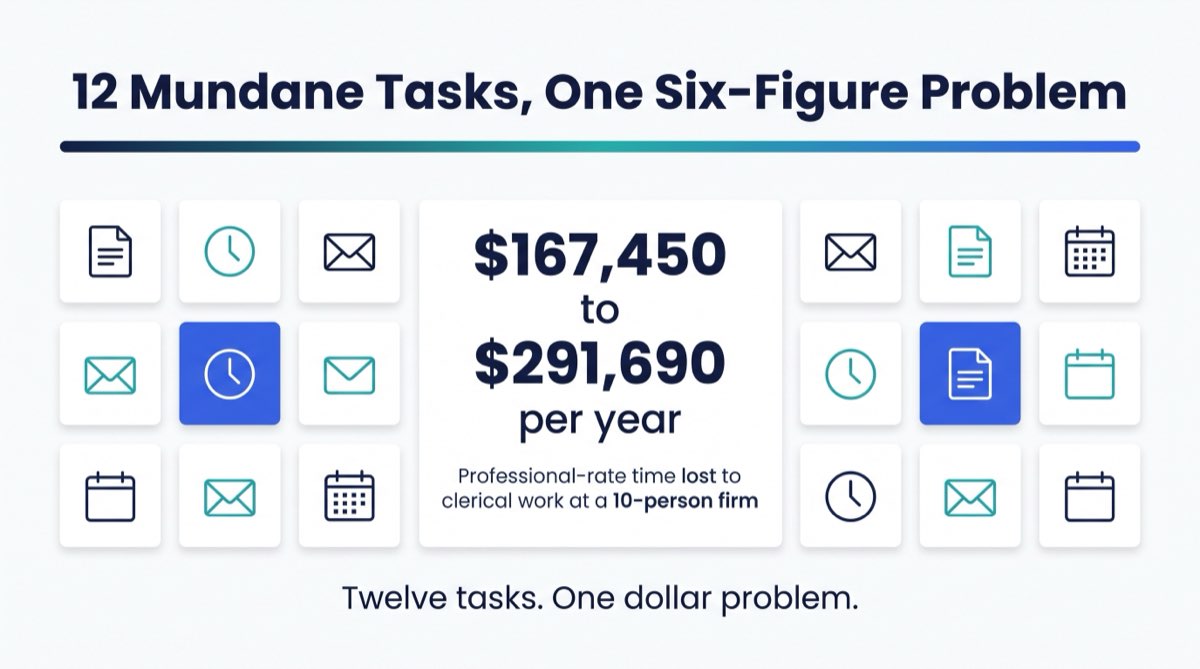
Your paralegal costs $65 an hour. Your bookkeeper, $55. Your account manager, $80. All three are writing emails a machine could draft in 40 seconds.
That is a prioritization problem, and the tools to fix it already exist. Once you put a dollar figure on the hours, you cannot unsee it.
AI handles one category of work well: repetitive, rule-based, low-judgment. Not the hard parts of anyone's job. But there is a defined list of work inside a $1M–$20M firm that no human needs to initiate, draft, or complete, and it is eating hours every week from people you pay professional rates to think.
Research from McKinsey & Company puts knowledge workers at roughly 28% of the workweek on email alone, much of it reading and answering routine messages that follow the same handful of patterns. At a five-person firm, 28% is more than a day a week, per person.
This article covers 12 tasks AI can take off your team's plate, ranked by time returned per week. For each one: what it is, who does it now, what it costs at a $5M firm, and what AI does instead.
The frame matters: AI gives your best people their hours back. It doesn't replace them. It promotes them out of work that was never worth their rate.
Jump to a task: 1. Meeting Notes · 2. Time Entries · 3. Client Status Updates · 4. Intake Qualification · 5. Document Triage · 6. PBC Document Chase · 7. Engagement Letters · 8. Conflict Check Scans · 9. CRM Data Enrichment · 10. Calendar Triage · 11. Inbox Triage · 12. Contract Clause Review
1. Meeting Notes and Follow-Up Action Drafts
Who does it now: Paralegals, account managers, project leads, coordinators, or whoever runs point on a meeting. The exact role varies by industry and firm size, but someone on staff is always writing this up by hand.
How long it takes: 45–60 minutes per meeting. A firm with 8–10 recurring weekly meetings burns 6–8 staff hours on post-meeting write-ups and follow-up drafts.
The dollar cost: A paralegal at $65/hr spending 3 hours a week on meeting notes is $10,140 a year of paralegal-rate work. That number ignores the lag between the meeting ending and the notes reaching the client.
What AI does instead: Tools like Otter.ai, Fireflies, or Microsoft Copilot transcribe the meeting in real time, format notes by speaker, extract action items, and draft a follow-up email organized by owner and due date. The paralegal reviews it in 8 minutes and sends it.
Those 3 hours go to deposition prep, client calls, and matter research, which is what a paralegal rate is supposed to buy.
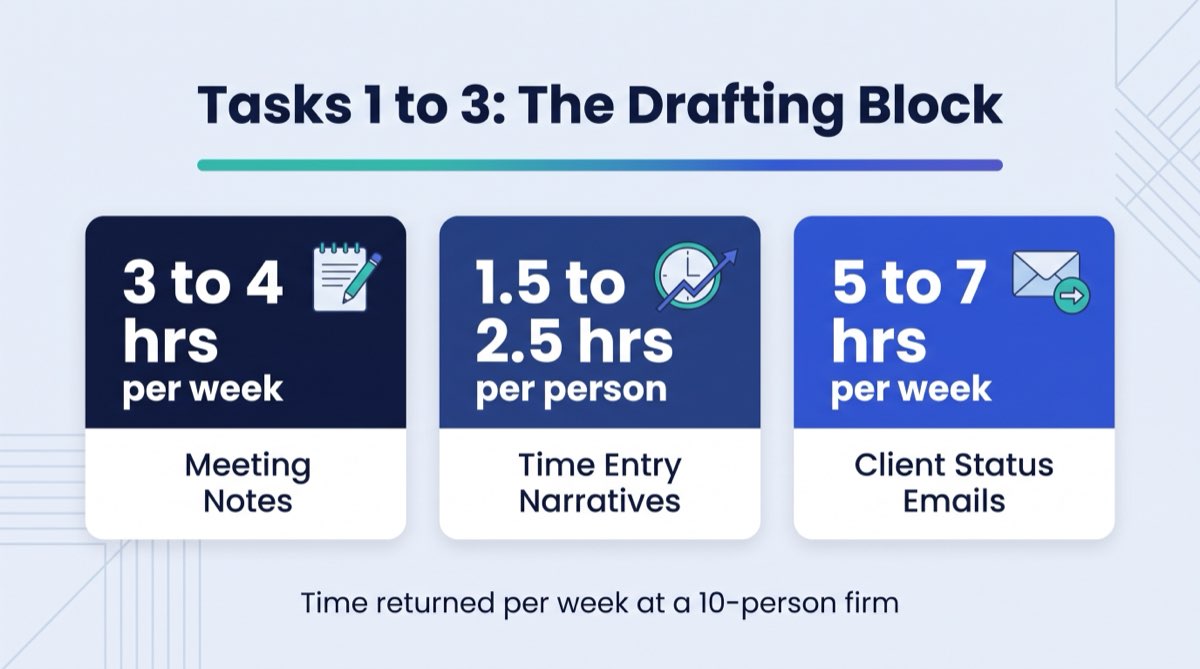
Time returned per week: 3–4 hours at a 10-person firm.
2. Time Entry Narratives
Who does it now: Attorneys, CPAs, financial advisors, account managers.
How long it takes: 20–30 minutes per billing day wherever staff write their own narratives.
The dollar cost: An attorney at $200/hr spending 25 minutes per day on time entries loses $833/month in billable-rate time to admin. Run that across three attorneys and you have $30,000/year of attorney-rate hours going to billing administration.
The number that gets attention: Three attorneys, 25 minutes a day each, on billing descriptions. $30,000 a year. That is one junior hire's salary, spent typing sentences a machine drafts in seconds.
What AI does instead: AI reads the attorney's calendar entries, email threads, and brief notes, then drafts billing narratives in the required format. The attorney reviews, adjusts if needed, and approves in under 5 minutes.
The rate differential is what makes this one of the highest-ROI tasks AI should automate in a law firm. You are paying $200/hr for three-sentence billing descriptions.
Time returned per week: 1.5–2.5 hours per professional staff member.
3. Client Status Update Emails
Who does it now: Paralegals, account managers, client services coordinators.
How long it takes: 10–15 minutes per client per update cycle. At a firm with 40 active matters and weekly update requirements, that is 6–10 hours per week of drafting.
The dollar cost: A client services coordinator at $50/hr spending 7 hours/week on status updates costs $18,200/year in coordinator-rate time for work that is already templated.
What AI does instead: AI pulls matter status, last action taken, and next scheduled step out of your practice management or CRM system and drafts the email. A human reads it and sends it. The client never knows the difference. They see updates arrive on schedule, usually more consistently than before.
For real estate teams, financial advisory firms, and CPA practices, this is one of the fastest wins to stand up, because the update structure is already predictable.
Time returned per week: 5–7 hours across the client services function.
4. Intake Qualification
Who does it now: Receptionists, junior staff, sometimes partners.
How long it takes: 15–30 minutes per inquiry, including triage, initial response, and routing. At a firm receiving 20+ inquiries per week, that absorbs 5–10 hours of staff time before a single qualified prospect reaches a professional.
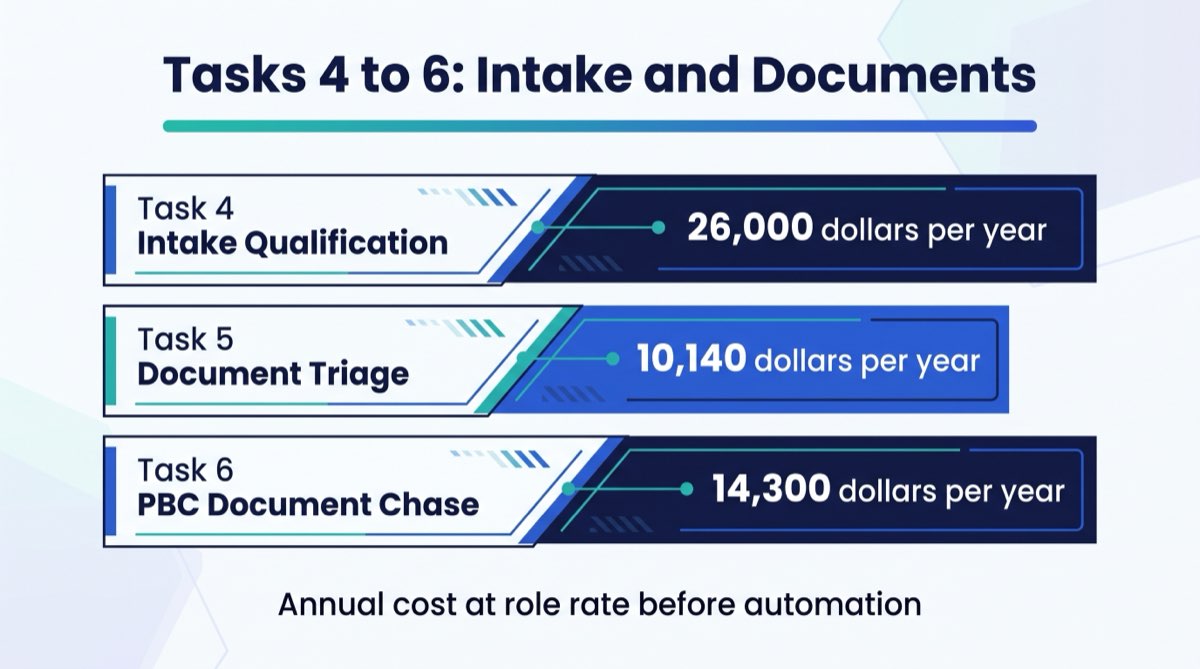
The dollar cost: At a law firm where a junior associate fields inquiries at $100/hr, 5 hours/week of intake work costs $26,000/year in associate-rate screening time. For many of those inquiries, the answer is "not a fit."
What AI does instead: An intake chatbot or AI-powered form screens new inquiries against your qualification criteria, routes qualified leads to the right team member, sends automated "not a fit" responses to the rest, and populates your CRM with the contact record before a human touches it. Your team only sees inquiries that already passed the screen.
This is an easy win for law firms and agency account teams alike. The AI doesn't make judgment calls on complex cases. It filters on the rules you define.
Intake is one of the most common time sinks at firms above $3M. A $150/hr staffer fielding "what do you charge?" at 4pm on a Friday is answering a question with a known answer. It never needed to reach a person.
Time returned per week: 4–8 hours in the intake/client services function.
5. Document Triage and Labeling
Who does it now: Paralegals, administrative staff, bookkeepers.
How long it takes: 2–4 hours per week at a mid-size firm. At firms with high document volume (real estate closings, litigation discovery, CPA audit prep), it runs 8–10 hours per week across the team.
The dollar cost: A paralegal at $65/hr spending 3 hours/week on document filing and classification costs $10,140/year. Then there is the error rate. Manual classification misfiles documents, and a misfiled document surfaces the day you need it, never before.
What AI does instead: AI reads incoming PDFs and email attachments, classifies them by document type (contract, invoice, correspondence, discovery material), extracts key metadata (parties, dates, amounts), and files them into the correct matter folder in your document management system. Humans handle exceptions.
Document triage is one of the highest-return items for paralegal-heavy teams once the classification rules are set.
Time returned per week: 3–6 hours across the admin function.
6. PBC Document Chase Emails
Who does it now: CPAs, bookkeepers, audit coordinators.
How long it takes: 30–60 minutes per week per active client engagement during busy season. For a CPA firm with 50 active clients, the PBC (provided by client) chase sequence alone consumes 20–30 hours of staff time per month.
The dollar cost: A bookkeeper at $55/hr spending 5 hours/week on client document follow-up emails costs $14,300/year in bookkeeper-rate time. Inconsistent chasing also trains clients to ignore the request.
What AI does instead: AI tracks which documents have arrived and which are outstanding, then sends personalized reminder sequences on a schedule you set. Each email carries the client's name, the specific documents still missing, and the deadline. No one drafts them, and nothing falls through.
This is a high-value task to automate first for CPA firms and bookkeeping practices. It cuts chase time and pulls outstanding materials in faster. To see how much operational waste your firm is carrying, the RunWell Blueprint finds this pattern in 10 minutes.
Time returned per week: 3–5 hours during high-volume periods.
Worth Knowing: Most of the work on this list is repetitive enough that off-the-shelf tools already handle it. At a 10-person professional firm averaging $75/hr across staff, moving even a few hours a week off that work changes the annual number.
7. Review Letter and Engagement Letter First Drafts
Who does it now: Attorneys, CPAs, financial advisors.
How long it takes: 20–45 minutes per letter, depending on complexity. At a 5-attorney firm sending 15–20 engagement letters per month, that is 5–15 hours of professional-rate time per month.
The dollar cost: An attorney at $200/hr spending 30 minutes per engagement letter on 15 letters per month costs $18,000/year in attorney-rate time on document formatting.
What AI does instead: AI drafts the engagement letter or review letter from a template, pulling client name, matter type, scope, fee structure, and key dates from your matter intake record. The professional reviews, adjusts, and signs. First draft to ready-to-send in 10 minutes instead of 45.
None of that is AI practicing law or accounting. It is AI handling the clerical half of a professional task so the professional spends the time on review and judgment instead of typing.
Time returned per week: 2–4 hours across the professional staff.
8. Conflict Check Preliminary Scan
Who does it now: Legal assistants, administrative staff, partners themselves.
How long it takes: 15–30 minutes per new matter intake at firms doing manual conflict searches. At 20 new matters per month, that is 5–10 hours of staff time on preliminary conflict screening.
The dollar cost: At $65/hr for a paralegal, 7 hours/month of conflict scanning = $5,460/year. The bigger cost is the bottleneck. No new matter opens until a human finishes the scan.
What AI does instead: AI runs a preliminary conflict check against your existing matter and contact database the moment a new client is entered, flags potential conflicts for human review, and clears clean intakes automatically. The attorney still reviews every flag and makes the final call. AI handles the scan that used to take 20 minutes per intake.
For law firms, this is one of the clearest examples of freeing employees from busywork: a task with clear rules, clear data, and a defined output that never required human judgment in the first place.
Time returned per week: 2–4 hours in the intake and conflicts function.
9. CRM Data Enrichment
Who does it now: Account managers, sales coordinators, admin staff.
How long it takes: 1–2 hours per week maintaining contact records, higher at firms with active prospect pipelines fed by referrals, events, and email exchanges.
The dollar cost: An account manager at $80/hr spending 1.5 hours/week on CRM updates costs $6,240/year on data entry.
What AI does instead: AI reads incoming email signatures, LinkedIn profiles (where integrated), and web data to enrich contact records automatically. When a new email arrives from a prospect, the AI pulls their title, company, phone number, and company size into the CRM record before the account manager opens the thread.
Incomplete CRM data compounds. Clean, enriched records mean better follow-up decisions, reports you can trust, and usable history when you get to what your firm can do with AI.
Time returned per week: 1.5–3 hours in the account management function.

10. Calendar Triage and Scheduling Reply Drafts
Who does it now: Administrative staff, assistants, sometimes professionals themselves.
How long it takes: 30–60 minutes per week per person managing a busy calendar, plus the coordination lag (average 3–4 email exchanges per meeting to get it scheduled).
The dollar cost: A legal assistant at $45/hr spending 2 hours/week on scheduling correspondence costs $4,680/year on calendar management. The hidden cost is the 3-day average lag between "let's meet" and a confirmed time.
What AI does instead: AI scheduling tools (Calendly with routing logic, or AI assistants like Reclaim or Motion) handle the back-and-forth, offer available times inside the parameters you define, and send confirmations automatically. For inbound meeting requests, AI drafts the reply with the link attached. No manual coordination.
Time returned per week: 1.5–2.5 hours per staff member who manages scheduling.
11. Inbox Triage
Who does it now: Everyone.
How long it takes: Research from Harvard Business Review puts professionals at an average of 2.6 hours per day on email. A large share of that is triage, deciding what needs action, what is informational, and what can be deleted.
The dollar cost: At a $5M firm with 10 professional staff averaging $80/hr, recovering 30 minutes per person per day from inbox triage returns $104,000/year in professional-rate time.
The largest number on this list: $104,000 a year, recovered from 30 minutes a day per person, at one 10-person firm. Inbox triage alone outweighs every other task on this list.
What AI does instead: AI reads incoming emails and labels them: urgent/needs action, FYI/no action required, delegate to [team member], or archive. The professional opens a pre-sorted inbox and starts with what matters. The rest waits, or never gets opened.
This is the most universal of the AI time savings use cases because it applies regardless of firm type. Financial advisory firms, real estate teams, marketing agencies, and CPA practices all name the inbox as their most consistent daily time drain.
The firms that get the most out of AI in year one tend to start with inbox and calendar. Not because it is the most exciting use case, but because the payback is immediate and it touches every person on the team.
Time returned per week: 2–4 hours per staff member.
12. Standard Contract Clause Review
Who does it now: Attorneys, paralegals, compliance staff.
How long it takes: 30–90 minutes per contract, depending on length and complexity. A real estate team or agency reviewing dozens of vendor, client, and lease agreements a month is spending full days on it.
The dollar cost: A paralegal at $65/hr spending 4 hours/week on contract clause review costs $13,520/year. An attorney doing the same review costs more than double.
What AI does instead: AI reads the contract, identifies non-standard clauses (deviations from your defined templates), flags language that typically requires attorney review, and produces a summary of key terms. The attorney or paralegal reads the flagged sections, not the whole document.
This is contract clause pre-screening, not full legal analysis. AI doesn't practice law. It does the pre-screening that used to require a full read-through. For financial advisory firms, agencies, and real estate teams carrying recurring vendor contracts, it is one of the fastest ways to cut professional-time spent on paperwork.
Time returned per week: 2–5 hours in the legal and contracts function.

The Full Dollar Picture
Here is what all 12 tasks add up to at a $5M professional firm with 10 staff:
| Task | Role Doing It | Est. Hours/Week | Annual Cost at Role Rate |
|---|---|---|---|
| Meeting notes + follow-up drafts | Paralegal / Account Mgr | 3–4 hrs | $10,140–$13,520 |
| Time entry narratives | Attorney / CPA / Advisor | 2.5 hrs/person | $26,000–$30,000 |
| Client status update emails | Client Services Coord | 5–7 hrs | $13,000–$18,200 |
| Intake qualification | Junior Staff / Associate | 4–8 hrs | $16,000–$26,000 |
| Document triage + labeling | Paralegal / Admin | 3–6 hrs | $10,140–$20,280 |
| PBC document chase emails | Bookkeeper / CPA staff | 3–5 hrs | $8,580–$14,300 |
| Engagement letter first drafts | Attorney / CPA | 2–4 hrs | $20,800–$41,600 |
| Conflict check preliminary scan | Legal Assistant / Admin | 2–4 hrs | $4,680–$9,360 |
| CRM data enrichment | Account Manager | 1.5–3 hrs | $6,240–$12,480 |
| Calendar triage + scheduling replies | Admin / Assistant | 1.5–2.5 hrs | $3,510–$5,850 |
| Inbox triage | All Staff | 2–4 hrs/person | $41,600–$83,200 |
| Standard contract clause review | Paralegal / Attorney | 2–5 hrs | $6,760–$16,900 |
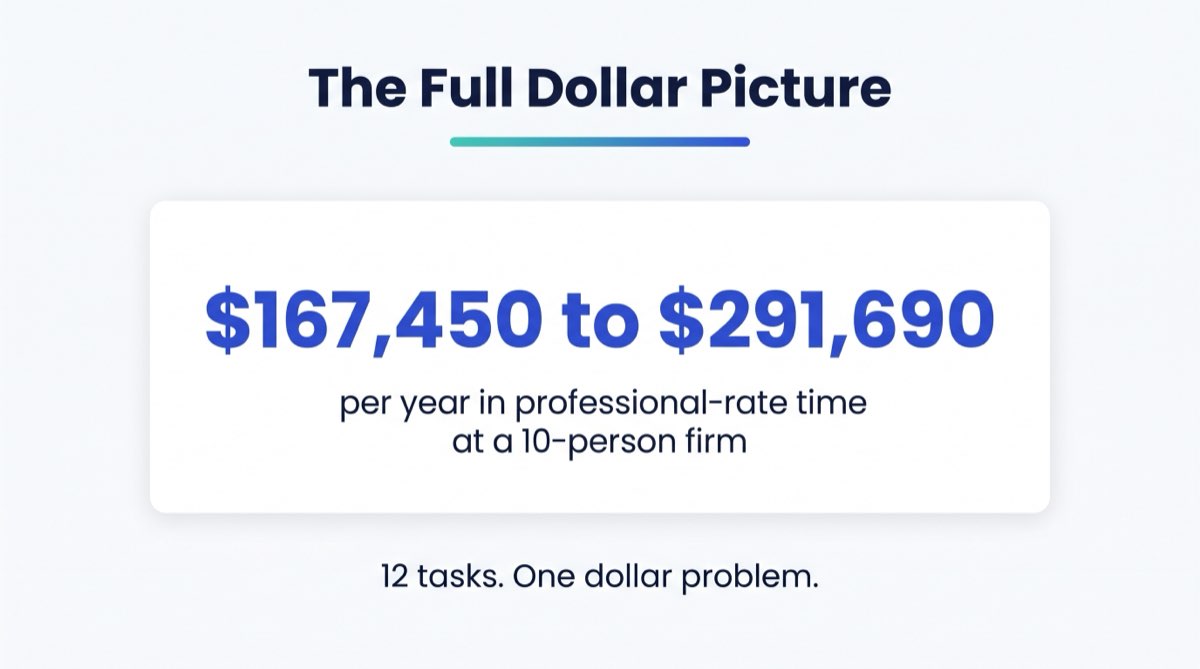
Conservative total: $167,450–$291,690 per year at a 10-person firm.
That is not the cost of automation. That is the cost of not automating.
Where to Start: The Three Highest-ROI Tasks
The 12 tasks are not equal in implementation effort. Some need a document management system integration. Others are an app install. Here is how to rank your starting point.
Start here if you have paralegals or legal staff: Meeting notes and inbox triage. Both return time immediately and need almost no setup. AI transcription tools connect to Zoom in under an hour. Inbox triage AI integrates with Gmail and Outlook and starts sorting on day one.
Start here if you have bookkeepers or CPA staff: PBC document chase and CRM enrichment. The chase sequence alone pays for most mid-tier automation platforms in the first month of busy season.
Start here if you have account managers or client services staff: Client status updates and intake qualification. The return is high and the implementation is predictable.

The mistake most firms make is automating everything at once. Pick the one task with the highest weekly time cost at your firm and build that workflow first. Get it stable. Then move to the next one.
If you're not sure which task has the highest return at your firm, that is what a diagnostic uncovers. The RunWell Blueprint runs it in 10 minutes. The work pattern looks the same in almost every firm at this size.
"Otherwise you're just going to automate garbage. Garbage in, garbage out... If it's not producing high-quality repeatable results, you need to redesign the system before you even think of automating."
Felicia Cristofaro, Founder of RunWell
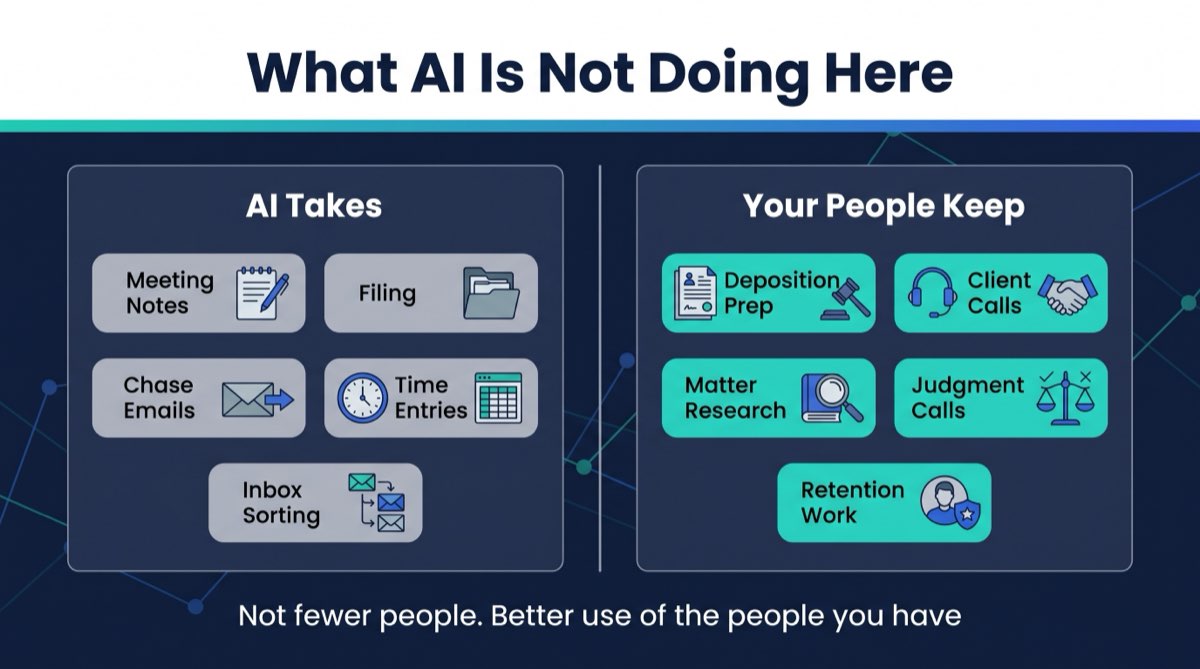
What AI Is Not Doing Here
This list gets misread as an argument for replacing staff. That is not the frame.
Your paralegal spending 3 hours on meeting notes is not a paralegal who should be replaced. She is a paralegal who should be doing deposition prep, client intake calls, and matter research. The AI doesn't take her job. It takes the part of her job her training never required and she would rather not do, the part crowding out the work that justifies her rate.
The same logic runs through AI for account managers. Two hours a day not spent writing status update emails is two hours a day for client calls, upsell conversations, and retention work, which is worth more to the firm than the automation costs.
This is what the AI-era operating system for professional firms looks like in practice. Not fewer people. Better use of the people you have.
There is a retention argument here too, and most firm owners underestimate it. Talented paralegals and bookkeepers leave firms where half the day is clerical. How AI affects your team and its morale is worth talking through before you implement anything.
The Cost You're Already Paying
Every week your team spends hours on the tasks in this list, you are paying professional rates for clerical output. That is not an accusation. It's a math problem.
The 12 tasks above are where most $3M–$20M professional firms are hiding $150,000–$300,000 in annual labor waste. Not in bloated headcount. Not in bad hires. In the work that accumulates around good people when there are no systems to take it off their plate.
AI does not fix every operational problem. It does not replace judgment, manage client relationships, win cases, or close audits. It handles these 12 tasks, and that frees your professionals for the work that justifies every dollar you pay them.
If you're not sure how much of this is happening at your firm, the RunWell Blueprint shows you exactly where to look. It's free.
If you already know the problem and want someone to build the system and back it with a guarantee, book a diagnostic call and we'll tell you within 30 minutes whether we can help.
Frequently Asked Questions
What mundane tasks can AI do at my firm?
AI performs best on tasks that are repetitive, rule-based, and driven by structured data rather than professional judgment. At professional service firms, the highest-value targets are meeting notes, time entry drafts, client status updates, intake screening, document classification, and inbox triage. Tools that handle all six integrate with the systems you already run.
What busywork should AI take over first?
Start with the tasks that combine high frequency, high time cost, and low judgment. At most $1M–$20M professional firms, inbox triage and meeting notes return the most time the fastest with the least implementation work. If billing-rate professionals are writing their own time entries by hand, that is usually the highest-dollar-return task to automate first.
Where should I start using AI at my firm?
Start with one workflow, not twelve. Pick the task with the highest weekly time cost for your highest-paid staff. Build that automation, stabilize it, and measure the result. Then move to the next one. The firms that fail at AI adoption almost always tried to automate too many things at once before any single workflow was stable.
What are AI's easy wins for professional service firms?
The easiest wins have predictable inputs and predictable outputs. Meeting transcription and note formatting, intake screening against clear qualification criteria, document classification into defined categories, and scheduling assistance all qualify. They are fast to implement, low-risk when imperfect, and measurable in the first week. Law firms report consistent wins with conflict check pre-screening and engagement letter drafts.
What tasks can I give to AI first without disrupting my team?
Start with tasks that don't change what the client experiences. Internal meeting notes, time entry drafts, and CRM enrichment are invisible to clients. Your staff gets time back with no external-facing change. Once those workflows are stable, expand to client-facing tasks like status update emails and intake qualification.
How much time can AI save my staff per week?
Using the ranges above, automating 3–5 of the highest-return tasks works out to 8–15 hours of recovered time per week across a 10-person team. That is close to one part-time hire, or roughly $20,000–$40,000 a year in recovered labor cost at average professional firm rates. Automating all 12 compounds that, though getting every workflow stable usually takes 6–12 months.
Does AI replace junior staff or paralegals?
No. The firms we work with use AI to redirect junior staff and paralegals toward higher-value work, not to cut headcount. A paralegal freed from document filing and meeting notes has more capacity for client communication, matter preparation, and work that requires her training. Staff quality tends to improve, because skilled people are doing skilled work.
Is AI automation at my firm expensive to implement?
It depends on the task and the tool. Inbox triage and meeting transcription tools start at $20–$50/month per user. Integrated intake automation and document management AI run higher. A full implementation covering 8–10 workflows typically costs $5,000–$15,000 in setup, plus platform fees. At a firm recovering $150,000+ in labor cost annually, the payback period is usually under 90 days.
Questions we get after this article


Want to see your firm's number?
10 questions. 3 minutes. A score out of 100 plus your top 3 operational gaps, with a dollar figure attached. Free. No email required to see the result.
Disclaimer. This article is for educational purposes only and does not constitute legal, accounting, tax, medical, or financial advice. References to specific compliance frameworks (ABA Model Rules, AICPA SSTS, SEC/FINRA, state bar rules) reflect the authors' and reviewers' interpretation as of the publish date and may not apply to your jurisdiction or specific facts. Consult your own licensed advisor before acting on anything written here. Statistics and case details have been anonymized; dollar figures reflect actual client outcomes as of the engagement date. RunWell is not a law firm, CPA firm, or registered investment advisor.